A distributed database stores data across multiple servers (nodes) connected by a network, managed as a single logical database. Distributed architecture enables horizontal scaling (adding commodity nodes to increase capacity) and high availability through automatic data replication. There are two primary distribution architectures: primary/secondary (master/slave), where one node owns all writes, and shared-nothing, where data is partitioned across all nodes with no single point of bottleneck. Couchbase uses a shared-nothing architecture with automatic vBucket-based data distribution, making it a natural fit for applications that require elastic scalability and always-on availability.
Primary/Secondary vs. Shared-Nothing Architecture
| Dimension | Primary/Secondary (Master/Slave) | Shared-Nothing (Masterless) |
|---|---|---|
| Data ownership | All data on primary; secondaries are read replicas | Data partitioned across all nodes, no single owner |
| Write scalability | Limited: all writes go to one primary | Linear: writes distributed across all nodes |
| Read scalability | Good, if reads can be served from secondaries | Excellent: reads distributed across all nodes |
Horizontal Scaling
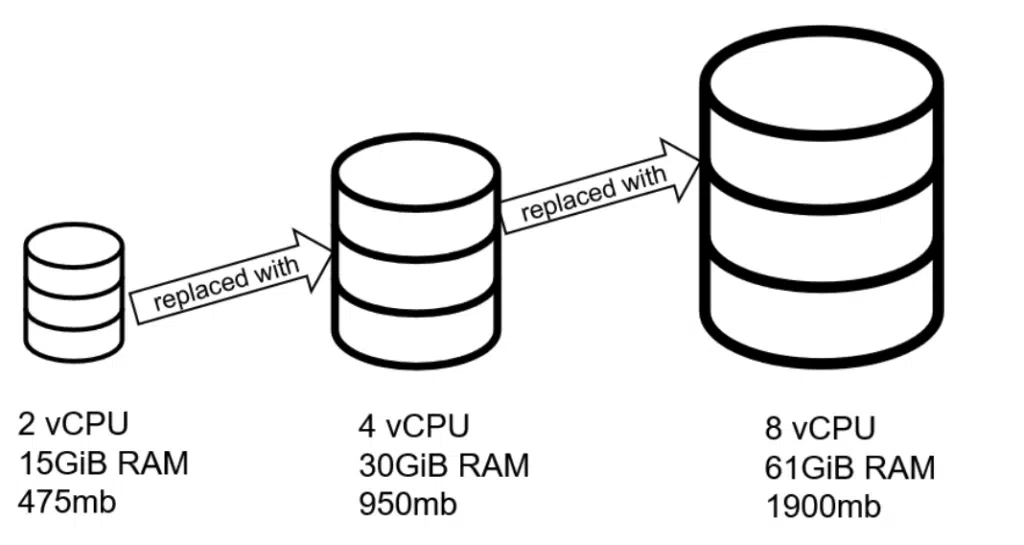
A single database server for a small set of applications and data has historically worked well. However, when exposed to a large, public user base, the only way to increase the capacity of these servers is to upgrade them to a more expensive server.
To improve capacity, move the database software to another single machine with more memory, more disk space, and more processors. This is called “vertical scaling.” The drawback to this approach is that it may require downtime. There’s also a ceiling on the performance that can be obtained from a single machine.
Unfortunately, many databases, especially relational databases (RDBMS), are not designed to be distributed and clustered.
However, distributed databases are created from the start to support elastic scalability. Need to add more resources to handle more load? Install the database software on one or more additional machines and add it to the cluster.
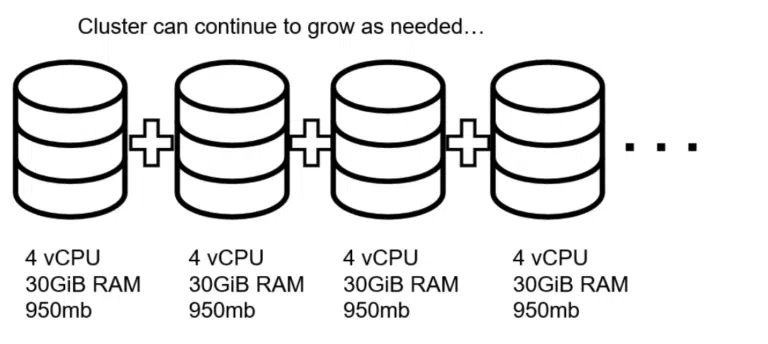
Then, add inexpensive commodity machines to the cluster when necessary. You can also remove them and scale down if you no longer need them.
Primary/Secondary Architecture
In a primary/secondary architecture, there is a designated “primary” server. This server stores all the data and handles all data requests. There are one or more “secondary” servers. These servers will receive data updates from the primary in order to stay in sync and store a complete replica of the data.
If the primary server goes offline (crashes), the remaining servers (and/or coordination servers) appoint one of the secondary servers to be the new primary.
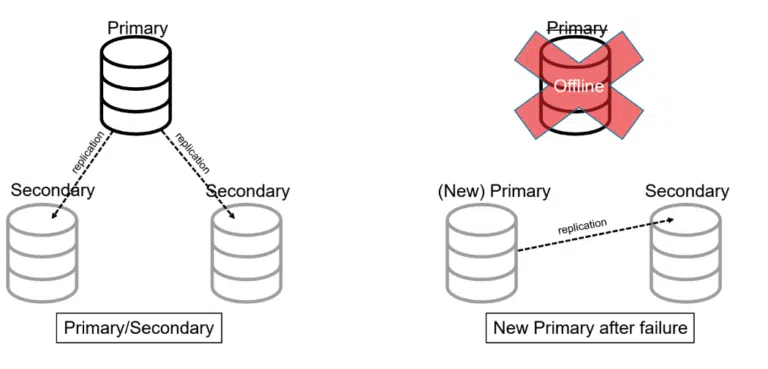
Architects use this pattern to provide high availability to traditional, non-distributed databases. However, this architecture doesn’t do much to address the issue of increased load. In order to accomplish that, sharding must be used.
Shared-Nothing Distributed Databases
Shared-nothing architecture involves splitting the data into partitions, usually called “shards.” Each shard lives on an individual server (node) in the cluster. For example, if there are 300 records and 3 nodes, each node would (ideally) store 100 records. Each additional node could further partition the data and continue spreading out the load as necessary.
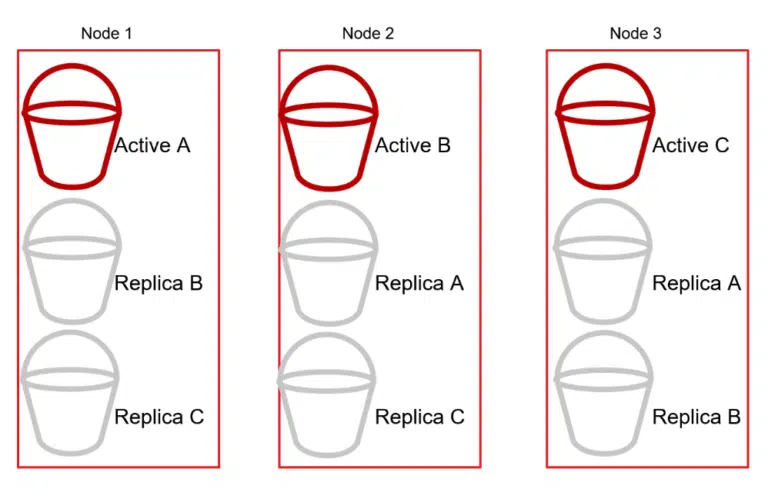
The cluster will also replicate shards between the nodes to maintain high availability. For instance, if Node 1 contains Active Shard A, then Node 2 would contain a Replica Shard A, and so on.
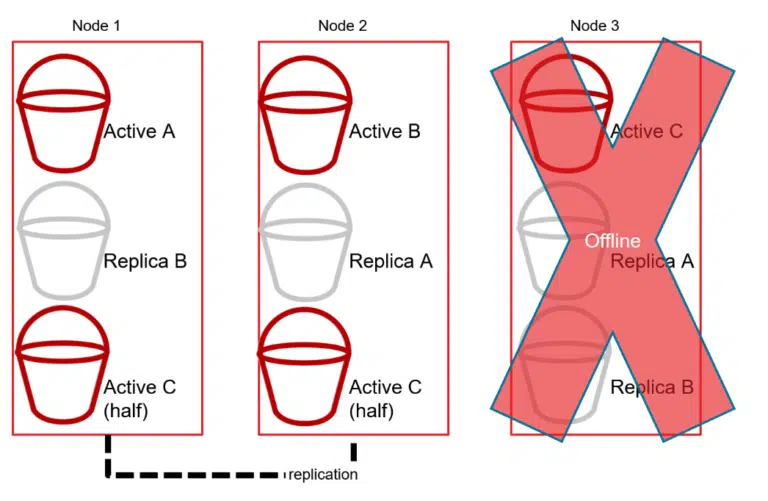
Then, if Node 3 goes offline, the cluster promotes the replicas from Shard C to Active status in order to keep the distributed database cluster online (as a whole).
The nature of relational databases is to store individual rows of data together in a tightly coupled table. This makes distributed SQL databases difficult. This is why organizations often choose NoSQL, where clustering, high availability, and replication are critical. NoSQL trades strictly coupled data that cannot exist outside a table in exchange for independent data that can exist in any given shard in a cluster.
Distributed Database Examples
Depending on the distributed database that you use, sharding may be completely automatic or require considerable effort to plan and maintain.
Let’s look at two examples of popular NoSQL distributed databases and how they differ:
How Couchbase Distributes Data - vBuckets
Couchbase uses a concept called vBuckets (virtual buckets) to distribute data across nodes in a shared-nothing cluster. A bucket is divided into 1024 vBuckets by default. Each vBucket is assigned to a node – both as an active vBucket (the primary copy) and as one or more replica vBuckets on other nodes. The Cluster Manager maintains a vBucket map that every SDK client uses to route requests directly to the correct node, eliminating the need for a central router or proxy.
Groves, M. (2026, June 16). Distributed databases: An overview. Couchbase Blog. https://www.couchbase.com/blog/distributed-databases-overview-2/